Advertisement
Twitch: Live Streaming is an influential real-time streaming video application that dominates the gaming and related fields. It was founded by Justin Kan and Emmett Shear in San Francisco in June 2011. It was formerly the gaming section of Justin.tv and later operated independently.
In terms of function, Twitch was originally intended to create an eSports video platform. Gamers can watch other people's gaming process in real time, learn game strategies, and watch game-related broadcasts and talk shows, etc., and it aspires to become the "ESPN of the gaming industry." The platform covers a wide range of game types, including real-time strategy, fighting, racing, first-person shooting and almost all other types on the market. Well-known games such as League of Legends, Dota2, and StarCraft are all on the list, and the games displayed on the homepage are arranged according to the audience's preferences.
In terms of usage, Twitch supports multiple devices. Although it does not support viewing on Sony PS3, it can be viewed on Microsoft Xbox 360 through a dedicated app, and Microsoft has cooperated with Twitch so that users can process and watch game streaming on Xbox One. In the future, Twitch plans to develop apps to support all game console platforms.
Twitch has achieved remarkable results, winning the "Webby Award" in 2012 and being selected as one of the top 10 mobile apps in terms of revenue in 2020. However, it also faces challenges, such as the data breach in 2021, the adjustment of the anchor's share ratio in 2022, and the controversy caused by broadcasting unauthorized content and gambling content. Overall, Twitch plays an important role in the field of game live broadcasting, continues to develop and evolve, and continues to bring unique experiences to game enthusiasts around the world.
Advertisement

View on mobile
Twitch: Live Streaming is a well-known real-time streaming video application that focuses on the field of games and is rich in functions and practical.
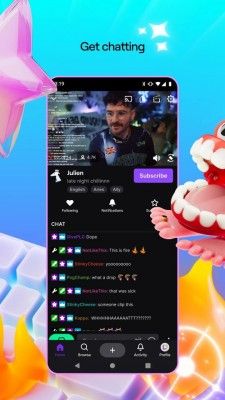
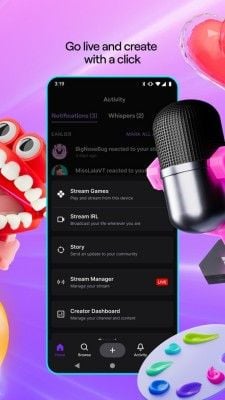
Core live broadcast function: Players can live broadcast their game process in real time, whether it is a fierce "League of Legends" team battle or exploring the wonderful world of "Minecraft", they can start live broadcast and share it with global audiences with one click. Viewers can easily find all kinds of popular game live broadcasts in the application, such as the highly competitive "Dota2" or the adventurous "Legend of Zelda". When watching the live broadcast, you can interact with the anchor and other viewers through barrage, send emoticons and text to express your ideas, such as sending "666" to express admiration when you see wonderful operations. You can also use the chat function to exchange game experience and discuss tactics with like-minded people in a special chat window.
Diverse content functions: In addition to game live broadcasts, Twitch also has a wealth of game-related programs. In talk shows, anchors will share interesting news and new game information in the game circle; documentaries will dig deep into the development stories behind the games and the development history of e-sports. For example, documentaries about the development of e-sports can let users understand how e-sports step by step to the world stage. In addition, it will also broadcast some well-known game events, such as the PlayerUnknown's Battlegrounds Global Invitational, so that players will not miss any exciting match.
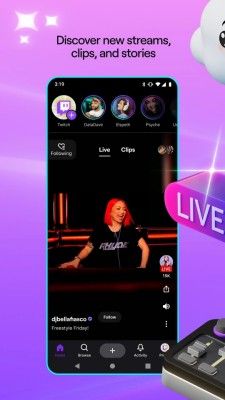
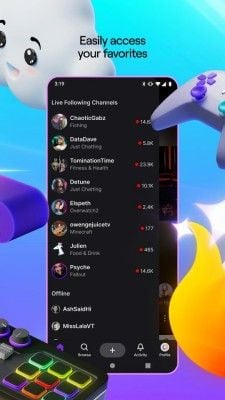
Personalization function: Users can follow the anchors they are interested in according to their preferences. After following, they will receive reminders when the anchors start broadcasting, so that they can watch them at the first time. You can also create your own favorites and add your favorite live broadcast content, anchors or specific game categories to them, so that you can find them quickly the next time you enter the app. For example, you can collect your favorite Diablo 3 anchors and exciting live broadcasts and review them at any time. At the same time, the app will accurately recommend related game live broadcasts and content based on the user's viewing history and interactive behavior, helping you discover more interesting content.
Usage steps: Open the app and choose to register an account or browse as a visitor. After registering and logging in, enter the game name and anchor name in the search bar on the homepage to find the target content, or explore in the popular game categories and recommended sections. Find the live broadcast you want to watch, click to enter and watch, and use the barrage and chat functions to interact during the viewing process. If you want to broadcast live yourself, you need to first perform simple settings such as identity authentication, prepare gaming equipment, microphone, etc., click the "Start Live Broadcast" button, select the game category, add a live broadcast title and description, and you can start your own live broadcast journey and share your gaming time with players around the world.
Advertisement